


PEPPER is a free annual report from the Centers for Medicare & Medicaid Services (CMS). It compares your agency's Medicare billing patterns to other home health agencies. It doesn't trigger audits or prove billing errors, but it shows where your claims stand out. Every agency should download it, review it, and use it to guide internal audits.
*This article was written in consultation with Mariam Treystman.
We're The Home Health Consultant, a consulting firm that helps home health and hospice agencies navigate regulatory compliance and operational efficiency.
CMS paused PEPPER in 2023 and released a redeveloped home health report in 2026 through a new portal. We wrote this article so agencies know what the report shows, how to get it, and what to do with it.
Get a preview of the insights shared in our monthly Administrative Compliance Program Exclusive Webinars!
What Is a PEPPER Report?
A PEPPER is a Program for Evaluating Payment Patterns Electronic Report. It's an Excel workbook showing your agency's Medicare claims statistics in areas at risk for improper payment. The report calls these areas target areas.
- It uses Medicare fee-for-service claims only. Medicare Advantage and other insurers' claims aren't included.
- It covers three calendar years. The current release includes 2023 through 2025, so you can see trends.
- It compares you to three peer groups. Your agency is ranked against home health agencies nationally, in your Medicare Administrative Contractor (MAC) jurisdiction, and in your state.
- It's released once a year. The next home health release is expected in 2027.
- It's aggregate only. The report doesn't list individual patients or claims.
CMS redeveloped the report for this release. Your results may differ slightly from older PEPPERs, even if your billing hasn't changed.
Does a PEPPER Outlier Mean My Agency Will Be Audited?
No, an outlier result doesn't trigger an audit. CMS calls PEPPER an educational tool and says outlier status is a flag for internal review (CMS webinar Q&A). The report also doesn't identify improper payments. It only shows where your patterns differ from your peers.
That doesn't make it safe to ignore. The target areas were chosen because the Office of Inspector General (OIG), Quality Improvement Organizations, and Recovery Auditors found them prone to improper payments. An agency that stands out in those areas has good reason to look closer before an outside reviewer does.
What Does the Home Health PEPPER Measure?
The home health PEPPER measures 10 target areas. Most are shown as a percentage of your agency's paid 30-day periods. The table below summarizes each one and what the User Guide says a high result could indicate.
A LUPA (low-utilization payment adjustment) applies when a 30-day period has too few visits. Medicare then pays per visit instead of the full period rate.
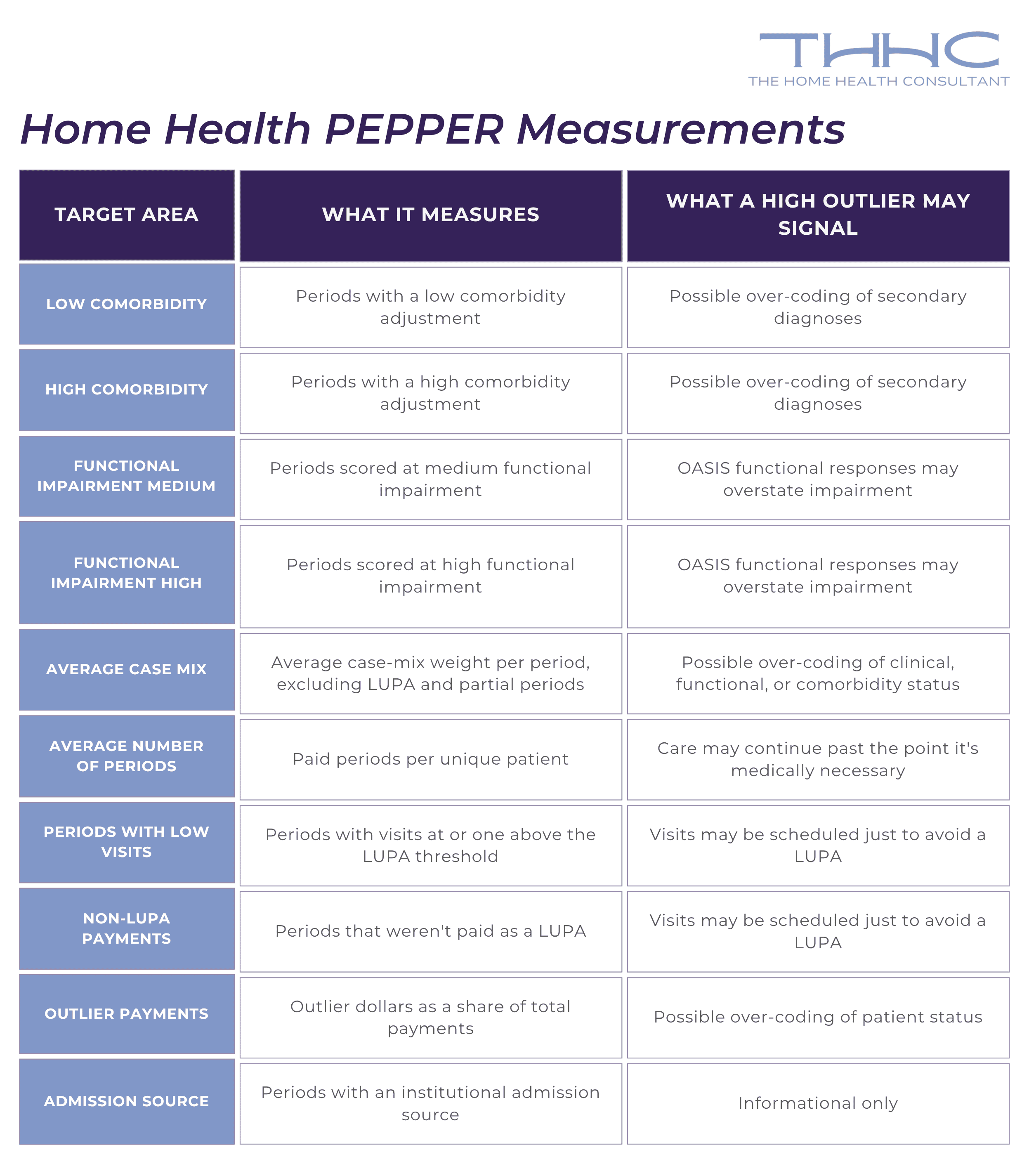
The four comorbidity and functional impairment areas can also flag a low outlier. A low result there may mean your agency is under-coding and missing payment it's entitled to. PEPPER is designed to catch both overpayments and underpayments.
How Do I Read My Agency's PEPPER Report?

Start with the Compare Targets Report tab, then open the tab for any target area that's flagged. The Compare Targets Report is the only place that shows your outlier status for every target area at once.
What Does It Mean to Be a PEPPER Outlier?
An outlier is an agency whose result differs from its peers. PEPPER uses two cutoffs:
- High outlier: your result is at or above the 80th percentile. In other words, at least 79% of agencies have a lower result than yours. On the report, this shows in red bold text.
- Low outlier: your result is at or below the 20th percentile. This applies only to the four comorbidity and functional impairment areas. It shows in green italics.
Results that aren't outliers appear in black. PEPPER doesn't use statistical significance tests to set these cutoffs. Being an outlier isn't a finding of wrongdoing. It means your numbers deserve a closer look, in the context of the patients you serve.
Which Comparison Matters Most?
The national comparison matters most, followed by your MAC jurisdiction, then your state. The User Guide ranks them that way because the state group is the smallest.
If you're an outlier in several areas, the User Guide suggests prioritizing by dollars and volume. Check the Sum of Payments and Numerator Count columns. A flagged area with more money and more claims behind it should usually come first.
What Does "No Data" Mean on My PEPPER?
"No Data" means your agency had fewer than 11 qualifying claims in that target area. CMS doesn't display results below that threshold. It isn't a problem or a penalty. If you can't find any PEPPER for your agency at all, you may not have had enough claims to generate one.
How Do I Get My Agency's PEPPER Report?

You download it from the PEPPER Portal, which you reach from the CMS PEPPER website. This release is the first one delivered through the new portal, so set up access before you need it.
To get in, you need a CMS Identity & Access Management System (I&A) account. It's the same login used for PECOS and NPPES. You also need one of these roles for your agency, with the PEPPER business function:
- Authorized Official (AO)
- Access Manager (AM)
- Staff End User (SEU)
Staff who need access should ask their agency's AO or AM to approve an SEU role. After you log in, select your agency's CMS Certification Number (CCN) and click the file to download it.
Save a copy as soon as you download it. Past PEPPERs aren't available once a new release comes out. The current report stays available until the 2027 release.
Who Do I Contact for PEPPER Help?
Use the contact that matches your problem:
- Compliance Program: Agencies on the compliance program can schedule one-on-one report reviews with our team.
- Login, I&A accounts, or finding your AO: the External User Services (EUS) Help Desk at EUS_Support@cms.hhs.gov or 1-866-484-8049.
- Portal access or questions about your results: the CMS PEPPER Help Desk at CMS_CBRPEPPER@cms.hhs.gov.
Don't contact your Quality Improvement Organization about PEPPER. The User Guide notes that they don't produce or distribute it.

What Should My Agency Do If It's a PEPPER Outlier?
Your agency should audit the claims behind the flag, fix what you find, and check whether the fix worked. CMS's webinar describes this three-step cycle.
- Audit the cases. Pull a sample of claims that meet the target area's numerator. Review the medical records, OASIS responses, and coding for patterns. First confirm there's enough volume to justify a review.
- Intervene. Use the User Guide's suggested interventions for that target area. Then put education or process changes in place to correct what the audit found.
- Follow up. Give the changes time to take effect. Then audit a new sample of claims submitted after the change, looking at the same issues. Compare your next PEPPER with this one to see if the pattern moved.
What you look for depends on the flag:
- Comorbidity, case mix, or outlier payments: confirm that every coded diagnosis and every OASIS response is supported by the medical record.
- Functional impairment: check that OASIS functional scoring reflects the patient's actual condition.
- Average number of periods: confirm documentation shows that skilled care was still reasonable and necessary. Review plans of care and discharge plans.
- Low visits or non-LUPA payments: confirm that visit frequency is driven by patient need, not by the LUPA threshold.
What If My Agency Isn't an Outlier?
Your agency should still review the report every year. Look at the three-year trend graphs for sudden jumps or drops. The User Guide notes that big changes often follow staff turnover, changes in services, or changes among local providers.
Keep a record of each review and what you did about it. That documentation shows your compliance program is working. The OIG encourages every home health agency to have a compliance program that includes regular billing audits, and PEPPER is built to support it.
What Should My Agency Do Next?
Your agency should work through these steps now, while the current report is available.
- Confirm who at your agency has an I&A account with the PEPPER business function.
- Download your PEPPER and save a copy in a secure location.
- Open the Compare Targets Report and note every red or green result.
- Prioritize flagged areas by national percentile, dollars, and claim volume.
- Audit a sample of claims for each priority area.
- Put education or process changes in place, and document them.
- Re-audit new claims after the changes take effect.
- Compare results when the next PEPPER is released in 2027.
Need Help Reviewing Your Agency's PEPPER?
The Home Health Consultant can help you make sense of your PEPPER and act on it. We help compliance customers read results, prioritize flagged target areas, and plan audits that hold up to outside review.
Schedule a call with us, see if the Compliance program is right for you and decide your next steps.

*Disclaimer: The content provided in this article is not intended to be, nor should it be construed as, legal, financial, or professional advice. No consultant-client relationship is established by engaging with this content. You should seek the advice of a qualified attorney, financial advisor, or other professional regarding any legal or business matters. The consultant assumes no liability for any actions taken based on the information provided.
Topics: